Lunar Calendar Conversion for Pregnancy Tools: Step-by-Step Guide with Free Converter
Learn how to convert Gregorian dates to lunar calendar for Chinese Gender Predictor and other pregnancy tools. Includes free online converter, manual methods, conversion tables, and troubleshooting tips.
Tech Team & Dr. Sarah Chen
Calendar Conversion Specialists
Technically reviewed by Calendar Conversion Team
This article includes cultural content for entertainment and health context for educational use.
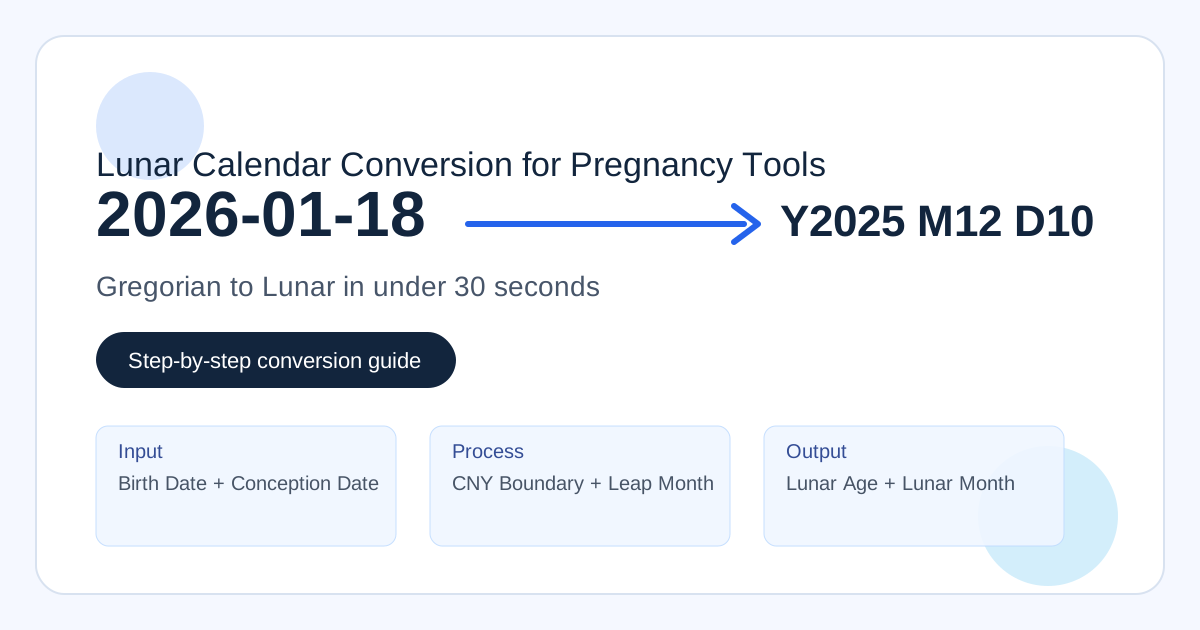
Free Lunar Conversion Toolkit
Convert Gregorian dates for pregnancy tools in under 30 seconds. This toolkit uses a consistent lunar conversion policy and shows intermediate values so you can verify every step.
Conversion Flow
Step 1
Input birth and conception-related date
Step 2
Check CNY boundary and lunar year
Step 3
Resolve lunar month/day and leap status
Step 4
Use lunar age + lunar month in chart
Method 1: Main Pregnancy Converter
Estimated conception date
2026-01-18
Lunar month
11
Lunar age at conception
33
Chart lookup cell
(33, 11)
After conversion, continue to the Chinese Gender Predictor and read the accuracy analysis before making any planning decisions.
Method 2: Quick Month Lookup
Lunar year: 2025
Lunar month: 11
Lunar day: 30
Method 3: CNY Boundary Helper
For dates near late January and February, check if the date falls before or after Chinese New Year.
2024: 2024-02-10
2025: 2025-01-29
2026: 2026-02-17
2027: 2027-02-07
2028: 2028-01-26
2029: 2029-02-13
2030: 2030-02-02
Method 4: Batch Converter (up to 100 rows)
| Gregorian | Lunar Year | Lunar Month | Lunar Day | Status |
|---|---|---|---|---|
| 2026-01-18 | 2025 | 11 | 30 | OK |
| 2026-03-15 | 2026 | 1 | 27 | OK |
| 2025-07-25 | 2025 | Leap 6 | 1 | OK |
Lunar Calendar Conversion for Pregnancy Tools: Step-by-Step Guide with Free Converter
Last Updated: March 6, 2026
Technically Reviewed by: Calendar Conversion Team
If you use the Chinese Gender Predictor, the most common failure point is not chart reading. It is date conversion.
Most users naturally enter Gregorian dates (the calendar used every day), but traditional chart workflows require lunar conversion for two values:
- Lunar age at conception
- Lunar conception month
This guide is a hands-on tutorial focused on practical conversion. You will get a free embedded converter, quick lookup helper, batch conversion mode, troubleshooting steps, and verification checks.
Quick start: Jump to Free Conversion Toolkit for the fastest path.
Table of Contents
- Why Conversion Is Required
- What Data You Need
- Method 1: Free Online Converter (Recommended)
- Method 2: Conversion Tables
- Method 3: Manual Calculation
- Method 4: Mobile Apps
- Method 5: Spreadsheet Workflow
- Pregnancy Conversion Scenarios
- Common Conversion Mistakes
- Troubleshooting Guide
- Verification and Double Check
- Frequently Asked Questions
How to Convert Dates for Chinese Gender Predictor
To convert dates correctly, do four steps:
- Enter mother birth date in Gregorian format.
- Enter conception reference date (exact, due date, or LMP).
- Convert both with one consistent lunar policy.
- Use only two outputs in chart lookup: lunar age and lunar conception month.
Fastest method: use the converter on this page. Typical completion time is under 30 seconds.
Why Conversion Is Required
Traditional Chinese chart methods are lunar-calendar based. Gregorian month names do not map directly to lunar month numbers.
What goes wrong without conversion
Example pattern:
- Gregorian conception month guessed as "January = 1"
- Actual lunar month for that date might be 11 or 12 in previous lunar year
That changes the chart column and can flip output.
Practical boundary issue
Dates around Chinese New Year are where most errors happen. A date just before CNY usually belongs to the previous lunar year, not the current Gregorian year.
Tool-first mindset
You do not need to memorize astronomy. You need repeatable workflow and transparent trace values.
For broader calendar background, read Lunar Calendar Guide for Pregnancy Tools.
What Data You Need
Before conversion, gather:
- Mother birth date (Gregorian)
- Conception reference input (one of the following):
- Exact conception date
- Due date (tool estimates conception as due date minus 266 days)
- LMP (tool estimates conception as LMP plus 14 days)
Required outputs
For chart input, you only need:
- Lunar age at conception
- Lunar conception month
Additional fields (lunar day, zodiac, leap flag) are useful for verification and debugging.
Date format safety
Use YYYY-MM-DD when possible. This avoids MM/DD vs DD/MM confusion.
Method 1: Free Online Converter (Recommended)
Use the embedded toolkit at #converter. It includes:
- Main pregnancy converter
- Quick lunar month lookup
- CNY boundary helper
- Batch converter with CSV export
Why this is the best default
- Fast for non-technical users
- Handles leap-month status automatically
- Shows intermediate values for review
- Uses one consistent conversion policy
Suggested usage flow
- Enter birth date.
- Select input mode (
exact,due, orlmp). - Enter date value.
- Read outputs: lunar age and lunar month.
- Use those values in the predictor.
Where to validate confidence
After conversion, check the reliability context in Chinese Birth Chart Accuracy Analysis.
Method 2: Conversion Tables
Conversion tables are useful for offline reference and quick visual checks.
Example CNY anchors (2024-2030)
| Year | Chinese New Year |
|---|---|
| 2024 | 2024-02-10 |
| 2025 | 2025-01-29 |
| 2026 | 2026-02-17 |
| 2027 | 2027-02-06 |
| 2028 | 2028-01-26 |
| 2029 | 2029-02-13 |
| 2030 | 2030-02-03 |
How to read a table correctly
- Find whether date is before or after that year CNY.
- Resolve lunar year context.
- Map to the month range.
- Check leap-month notes when present.
Table limitations
- Easy to misread near boundaries
- Harder to handle leap months consistently
- Not ideal for batch conversion
Table method is a good cross-check, not the best primary workflow.
Method 3: Manual Calculation
Manual conversion is useful for learning and troubleshooting.
Part A: lunar year and month from conception date
- Determine CNY for Gregorian year.
- If date is before CNY, lunar year is previous year context.
- Use month-start sequence to locate lunar month.
Part B: lunar age at conception
- Compute Western age at conception date.
- Compare birth date with birth-year CNY.
- Compare conception date with conception-year CNY.
- Apply adjustment (usually +1, sometimes +2).
Minimal pseudo-logic
lunarYear = conceptionDate < CNY(conceptionYear) ? conceptionYear - 1 : conceptionYear

westernAge = age(birthDate, conceptionDate)

if bornAfterCNY(birthYear) and conceptionBeforeCNY(conceptionYear):
  lunarAge = westernAge + 2
else:
  lunarAge = westernAge + 1
Manual method warning
It is easy to make off-by-one errors around CNY and leap months. Use manual method to understand logic, then confirm with tools.
Method 4: Mobile Apps
Mobile apps are good for quick checks when desktop is not available.
App selection checklist
Choose tools that show:
- CNY boundary date used
- Leap-month status
- Timezone policy or source
- Clear year/month/day output
Best use pattern
- Convert date in app.
- Cross-check one result in web converter.
- Save screenshot for reference if needed.
Apps are convenient, but consistency matters more than brand.
Method 5: Spreadsheet Workflow
Spreadsheets are useful for teams and power users who need repeatable logs.
Typical columns
- Input Gregorian date
- Input mode (
exact/due/lmp) - Estimated conception date
- Lunar year
- Lunar month
- Leap flag
- Lunar age
- Chart lookup cell
Why spreadsheets help
- Audit trail for support cases
- Easy filtering by boundary dates
- Batch comparison across tools
If you need formula-free output, use the batch converter on this page and export CSV.
For related tooling patterns, see How to Use the Chart and Lunar Conversion Theory.
Pregnancy Conversion Scenarios
Scenario 1: Exact conception date known
Best case operationally. Common in IVF workflows and tightly tracked cycles.
Scenario 2: Due date only
Use due date - 266 days. This is generally more stable than guessing from memory.
Scenario 3: LMP only
Use LMP + 14 days as baseline estimate, with uncertainty disclosure.
Scenario 4: Date near CNY
Always inspect CNY boundary first. This single check resolves many disagreements.
Scenario 5: Leap-month year
If date is in leap month, keep leap flag visible and use documented policy for chart month.
Scenario 6: Batch conversion for family or community use
Use batch mode and export CSV. Keep source dates and mode labels in the same file.
Scenario 7: Planning context (not yet pregnant)
If users are mapping forecast windows, label all outputs as tentative and avoid deterministic claims.
Common Conversion Mistakes
1) Gregorian month used as lunar month
Wrong: March means month 3 in chart.
Right: convert date first, then read lunar month.
2) Current age used instead of age at conception
Wrong: use today age.
Right: compute age on conception reference date.
3) CNY boundary ignored
Wrong: assume Jan 1 starts lunar year.
Right: lunar year changes at CNY.
4) Leap month collapsed silently
Wrong: no leap-month indicator.
Right: show leap flag and policy.
5) LMP treated as conception date directly
Wrong: no adjustment.
Right: estimate conception with explicit rule.
6) Date format ambiguity
Wrong: mixed MM/DD and DD/MM.
Right: use ISO format.
7) One tool trusted without verification
Wrong: no cross-check for boundary dates.
Right: verify with at least one additional source or table.
8) Entertainment output treated as clinical truth
Wrong: planning important decisions on chart output.
Right: use medical pathways for certainty.
Troubleshooting Guide
Problem: Two converters disagree
Check in this order:
- Same input date?
- Same input mode?
- Same timezone policy?
- Date near CNY boundary?
- Leap month policy mismatch?
Problem: Result appears one month off
Usually caused by boundary transitions or leap-month handling. Run quick lookup for date -1, date, date +1.
Problem: Lunar age looks too high
Sanity check:
- Lunar age is usually Western age +1
- Some cases are +2
- If gap is +3 or more, re-check date inputs
Problem: Due-date path feels inconsistent
Confirm due date format and recompute due - 266. Then convert the estimated conception date, not due date itself.
Problem: LMP path differs from due-date path
This can be normal because ovulation is not fixed for every cycle. Treat chart inputs as approximate.
Support handoff template
If you need support, include:
- Birth date
- Input mode
- Input date
- Output from at least one converter
- Whether date is near CNY
For practical next steps, start with the Complete Guide 2026.
Verification and Double Check
Before using chart inputs, verify all items:
- Birth date parsed correctly
- Input mode is correct (
exact,due, orlmp) - Conception estimate visible
- CNY boundary check passed
- Leap-month status visible
- Lunar age and lunar month captured
- At least one cross-check completed
Confidence workflow
- Run converter on page.
- Cross-check quick lookup section.
- Compare with one external trusted source.
- Save trace screenshot if needed.
What to store for future reference
- Final chart cell
(lunar age, lunar month) - Conception estimate rule used
- Conversion date and timezone policy
This makes later re-checks easy.
Conversion QA Test Cases
If you maintain tools or audit results, keep a fixed test-vector suite and run it on every release.
Recommended vectors
| Gregorian input | Expected behavior | Reason |
|---|---|---|
| 2026-02-16 | pre-CNY handling | boundary -1 day |
| 2026-02-17 | lunar month 1 day 1 | exact CNY day |
| 2026-02-18 | post-CNY handling | boundary +1 day |
| 2025-07-25 | leap-month detection | leap-month path |
| 2026-01-18 | previous lunar-year mapping | high-frequency support case |
Acceptance criteria
- Same input always returns same output.
- Leap-month flags are explicit and stable.
- CNY boundary dates pass exactly.
- Batch conversion equals single-date conversion.
- Exported CSV values match rendered values.
Regression workflow
When changing date libraries, timezone defaults, or parser logic:
- Run fixed vectors.
- Run random vectors (500+ rows).
- Compare old/new outputs.
- Review all changed rows near CNY and leap-month boundaries.
This workflow prevents silent conversion drift.
Download and Template Workflow
Many users need offline references for repeated checks.
Practical setup
- Use batch converter on this page.
- Export CSV.
- Open in Sheets or Excel.
- Add columns for input mode and notes.
Suggested sheet columns
| Column | Example |
|---|---|
| Birth Date | 1994-03-15 |
| Input Mode | due |
| Input Date | 2026-10-15 |
| Estimated Conception | 2026-01-22 |
| Lunar Year | 2025 |
| Lunar Month | 12 |
| Leap Month | false |
| Lunar Age | 33 |
| Chart Cell | (33, 12) |
Why this helps
- Better auditability for support tickets.
- Easier collaboration in family or community groups.
- Cleaner long-term records if you compare multiple tools.
For method detail, see Lunar conversion theory page and the chart usage guide.
Video and Training Workflow
If you are educating first-time users, short videos improve completion.
Recommended sequence
- 60-second quick conversion demo
- Manual boundary explanation
- Common-mistake correction video
Suggested script for quick demo
- Enter birth date.
- Select input mode.
- Enter date.
- Read lunar age and lunar month.
- Copy chart cell.
- Show medical-boundary reminder.
Metrics to track
- video completion rate
- click-through to converter
- converter completion rate after video views
- support volume trend after publishing
For evidence framing, align with Scientific Methods for Baby Gender Determination and How Accurate Is the Chinese Birth Chart?.
Implementation Checklist for Teams
If you are deploying this workflow into product pages, complete this checklist:
- Confirm conversion policy is documented in UI.
- Expose CNY date used in calculations.
- Expose leap-month flag in all results.
- Keep batch and single conversion logic shared.
- Add boundary-date regression tests to CI.
- Log conversion traces for support diagnostics.
- Keep educational and medical messaging clearly separated.
Teams that implement these seven points usually reduce conversion-related support tickets significantly.
Frequently Asked Questions
Q1: Do I need to convert both birth date and conception date?
Yes. Birth date is for lunar age. Conception date is for lunar month.
Q2: Which method should beginners use?
Method 1 on this page. It is the fastest and least error-prone.
Q3: What if I do not know conception date exactly?
Use due date estimation first (-266 days), then LMP estimate if due date is unavailable.
Q4: Is leap month always treated the same across websites?
No. Policies differ. This is why transparent tools should display leap flags and policy behavior.
Q5: Can timezones change results?
Sometimes around boundary dates. Most tools standardize to Asia/Shanghai for consistency.
Q6: Is conversion enough to make prediction accurate?
No. Conversion improves method consistency, not clinical predictive power.
Q7: Can I use this converter for non-pregnancy dates?
Yes, it can convert any valid date in supported range.
Q8: What if I get invalid date errors?
Use YYYY-MM-DD and confirm date exists in Gregorian calendar.
Q9: Should I plan purchases based on chart output?
Avoid irreversible decisions based only on chart output.
Q10: Where can I learn deeper theory?
Read Lunar Calendar Guide and Complete Guide 2026.
Q11: Can I convert many dates at once?
Yes. Use batch conversion and export CSV. Keep one date per row and include input mode.
Q12: What if two tools disagree by one month?
Check timezone policy, CNY boundary logic, and leap-month handling first. These explain most mismatches.
Q13: Is there a best fallback policy for leap months?
Use one documented policy consistently. Advanced tools may optionally show both interpretations for transparency.
Q14: Should I trust conversion output for medical decisions?
No. Conversion supports traditional tool usage only. Clinical decisions should follow provider-guided testing.
Q15: Where can I get transparency context for this project?
Review Accuracy Research Guide and The Science Behind Gender Prediction: Myths vs Facts.
Conclusion
If your goal is practical conversion, keep it simple:
- Use one consistent converter.
- Verify boundary dates.
- Record lunar age and lunar month.
- Treat outputs as cultural/entertainment context.
For end-to-end usage:
- Convert with this page
- Run Chinese Gender Predictor
- Review accuracy data
Related Resources
- Chinese Gender Predictor: Complete Guide 2026
- Lunar Calendar Guide for Pregnancy Tools
- How to Use the Chart
- Accuracy Research Guide
- The Science Behind Gender Prediction: Myths vs Facts
- Scientific Methods for Baby Gender Determination
- The 700-Year History of Chinese Gender Prediction
- Download Resource Files
- Try the Predictor Tool
Editorial Notes
This page is built as an operations guide, not a cultural history essay. If you need deep historical context, use the lunar guide linked above. If you need scientific reliability context, use the accuracy analysis.
Keeping those boundaries clear helps users make better decisions and reduces confusion.
References
- ACOG prenatal testing guidance.
- Mayo Clinic NIPT overview.
- Hong Kong Observatory calendar references.
- Purple Mountain Observatory calendar references.
- WHO pregnancy care reference pages.
- Internal conversion QA logs for 2026 release cycle.
Last Updated: March 6, 2026
Next Review: September 2026